Enter the folder
First step is to create a bundle folder in “%ProgramData%/Autodesk/ApplicationPlugins”. the bundle folder is a normal windows folder that ends with .bundle (ex. MyApp.bundle)
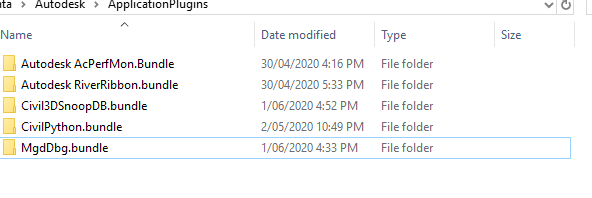
Folder contents
Inside this folder there should be a folder named (“Contents”) and a file named (“PackageContents.xml”).
Place *.dll inside the contents folder
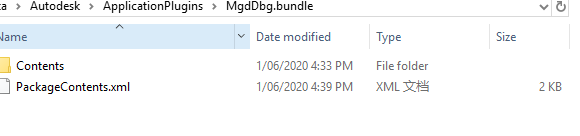
Modify the XML file
code inside PackageContents.xml can be as simple as the following (Change things like “MyApp”, “MyName”, etc… and it works):
Put the *.dll file inside the Contents folder.
ProductCode(GUID)
private string getGUID()
   {
       System.Guid guid = new Guid();
       guid = Guid.NewGuid();
       string str = guid.ToString();
       return str;
   }
or on the visual Studio
Tools ----Create GUID
Auto Run Command when loading .dll file
<?xml version="1.0" encoding="utf-8"?>
<ApplicationPackage SchemaVersion="1.0" AppVersion="1.0.0" ProductType="Application"
    ProductCode="{6A1C1EAE-3744-4BD8-AF08-F322E92D9B3B}"
    Name="RibbonTest"  Description="MyAPP, My description"  SupportedLocales="Enu" AutodeskProduct="AutoCAD">
  <CompanyDetails Name="myribbontest" Email="yangfan7014@gmail.com" />
  <RuntimeRequirements SupportPath="./Contents" OS="Win32|Win64" Platform="AutoCAD*|AutoCAD" SeriesMin="R20.1" SeriesMax="R24.0"/>
  <Components Description="Main">

    <ComponentEntry  AppName="MyAPP" Version="1.0.0" ModuleName="./Contents/18RibbonT.dll" LoadOnAppearance="True" LoadOnAutoCADStartup="True" LoadOnCommandInvocation="True">
      <Commands GroupName="_18RibbonT">
        <Command Local="RibbonDemo" Global="RibbonDemo" StartupCommand = "True" />
      </Commands>
	  </ComponentEntry>

    <ComponentEntry  AppName="Ramps" Version="1.0.0" ModuleName="./Contents/Ramps.dll" LoadOnAutoCADStartup="True">
      <Commands GroupName="Commands">
        <Command Local="CRAMPS" Global="CRAMPS" />
      </Commands>
    </ComponentEntry>

  </Components>
</ApplicationPackage>
Reference
https://adndevblog.typepad.com/autocad/2013/01/autodesk-autoloader-white-paper.html
https://stackoverflow.com/questions/46282189/autocad-2018-autoload-dll
https://stackoverflow.com/questions/46282189/autocad-2018-autoload-dll
https://www.cnblogs.com/linzheng/archive/2010/12/14/1905906.html