Introduction
After learning how to draw a line with AutoCAD API, we can use similar way to create other drawable objects. We only need to go into the content of the objects’ class, and we just feed the objects what they need, the objects can be created.
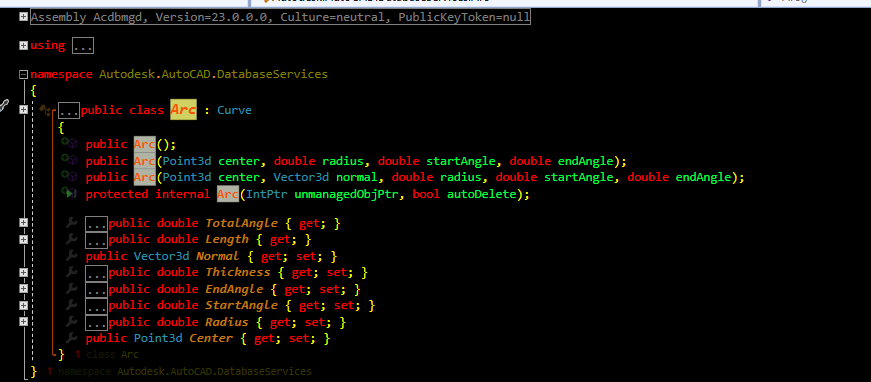
For example, from the figure above, we can see how to create the Arc.
There are three method
WAY1
- Create the empty Arc Object
- The we assign the empty object with other properties
WAY2
- While creating the Arc object, we give the center point and radius
- start angle and end angle of the Arc
WAY3
- While creating the Arc object, we give the center point, vector and radius
- start angle and end angle of the Arc
public Arc();
public Arc(Point3d center, double radius, double startAngle, double endAngle);
public Arc(Point3d center, Vector3d normal, double radius, double startAngle, double endAngle);
Apparently, in AutoCAD we have many more ways to create Arc, since the software helped us to calculate the input values to the parameters for the mothod to create the Arc objects.
Now we go to the next topic.
Object Modification
As mentioned before, the object has some methods and properties for us to modify it.
01. Derivatives
When checking the inheritage chain, we can find other methods and properties from the derived classes.
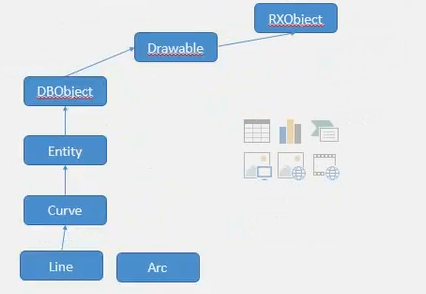
Let’s have a look at the properties of the entity
namespace Autodesk.AutoCAD.DatabaseServices
{
    [TypeDescriptionProvider("Autodesk.AutoCAD.ComponentModel.TypeDescriptionProvider`1[[Autodesk.AutoCAD.DatabaseServices.Entity, acdbmgd]], acdbmgd")]
    [Wrapper("AcDbEntity")]
    public abstract class Entity : DBObject
    {
        protected internal Entity(IntPtr unmanagedObjPtr, bool autoDelete);

        [Category("3D Visualization")]
        public ObjectId FaceStyleId { get; set; }
        [Category("3D Visualization")]
        public ObjectId VisualStyleId { get; set; }
        public virtual bool ForceAnnoAllVisible { get; set; }
        [Category("Misc")]
        public string BlockName { get; }
        [Category("3D Visualization")]
        public Mapper MaterialMapper { get; set; }
        [Category("3D Visualization")]
        public ObjectId MaterialId { get; set; }
        [Category("3D Visualization")]
        public string Material { get; set; }
        [Category("3D Visualization")]
        public virtual bool ReceiveShadows { get; set; }
        [Category("3D Visualization")]
        public virtual bool CastShadows { get; set; }
        [Category("General")]
        public HyperLinkCollection Hyperlinks { get; }
        public virtual bool CloneMeForDragging { get; }
        [Category("Geometry")]
        public virtual Matrix3d CompoundObjectTransform { get; }
        [Category("Geometry")]
        public virtual Extents3d GeometricExtents { get; }
        [Category("3D Visualization")]
        public ObjectId EdgeStyleId { get; set; }
        public virtual Matrix3d Ecs { get; }
        [Category("Geometry")]
        public virtual CollisionType CollisionType { get; }
        [Category("General")]
        public virtual LineWeight LineWeight { get; set; }
        [Category("General")]
        public virtual bool Visible { get; set; }
        [Category("General")]
        [UnitType(UnitType.Unitless)]
        public virtual double LinetypeScale { get; set; }
        [Category("General")]
        public virtual ObjectId LinetypeId { get; set; }
        [Category("General")]
        public virtual string Linetype { get; set; }
        [Category("General")]
        public virtual ObjectId LayerId { get; set; }
        [Category("General")]
        public virtual string Layer { get; set; }
        [Category("General")]
        public virtual PlotStyleDescriptor PlotStyleNameId { get; set; }
        [Category("General")]
        public virtual string PlotStyleName { get; set; }
        [Category("General")]
        public virtual Transparency Transparency { get; set; }
        [Category("General")]
        public EntityColor EntityColor { get; }
        [Category("General")]
        public virtual int ColorIndex { get; set; }
        [Category("Geometry")]
        public virtual bool IsPlanar { get; }
        [Category("General")]
        public virtual Color Color { get; set; }
        [Category("Misc")]
        public ObjectId BlockId { get; }
Hence, all the derivatives of the entity
The main property we can modify is listed as below.
- Color
- Layer
- Linetype
- Linetype scale
- Lineweight
- Plot style name
- Visibility
- Transparency
Entity Derivative
Curve
 Line
 Arc
 Circle
 PolyLine
 Ellipse
Hatch
Then, we can modify the entity by its property.
02. Color Modification
///
/// Change entity color
///
/// Entity ObjectId
/// Color Index
/// Entity ObjectId

public static ObjectId ChangeEntityColor(this ObjectId c1Id, short colorIndex)
{
    // Current Database
    Database db = HostApplicationServices.WorkingDatabase;
    // Open a transaction
    using (Transaction trans = db.TransactionManager.StartTransaction())
    {
        // Open block table
        BlockTable bt = (BlockTable)trans.GetObject(db.BlockTableId, OpenMode.ForRead);
        // Open blocktable record
        BlockTableRecord btr = (BlockTableRecord)trans.GetObject(bt[BlockTableRecord.ModelSpace], OpenMode.ForWrite);
        // Get the object
        Entity ent1 = (Entity)c1Id.GetObject(OpenMode.ForWrite);
        // Set object color
        ent1.ColorIndex = colorIndex;
        trans.Commit();
    }
    return c1Id;
}
03. Copy Entity
//
///  Copy one entity, and add the copied one into blocktable record
///
/// Entity ObjectId
/// Reference source Point
/// Reference Target Point
public static Entity CopyEntity(this ObjectId entId, Point3d sourcePoint, Point3d targetPoint)
{
    // Declare a object
    Entity entR;
    // Current database
    Database db = HostApplicationServices.WorkingDatabase;
    using (Transaction tr = db.TransactionManager.StartTransaction())
    {
        // Open Blocktable
        BlockTable bt = (BlockTable)tr.GetObject(db.BlockTableId, OpenMode.ForRead);
        // Open Blocktable Record
        BlockTableRecord btr = (BlockTableRecord)tr.GetObject(bt[BlockTableRecord.ModelSpace], OpenMode.ForRead);

        // Entity ent = (Entity)tr.GetObject(entId, OpenMode.ForWrite);
        // Open the entity
        Entity ent = (Entity)entId.GetObject(OpenMode.ForWrite);
        // Calculate the Vector from source point to the target point
        Vector3d vectoc = sourcePoint.GetVectorTo(targetPoint);
        Matrix3d mt = Matrix3d.Displacement(vectoc);
        entR = ent.GetTransformedCopy(mt);
        // Commit the transaction
        tr.Commit();
    }
    return entR;
}
04. Rotate the object
///
/// Rotate the entity
///
/// Object
/// Rotate base point
/// Rotating angle
public static void RotateEntity(this ObjectId entId, Point3d center, double degree)
{
    // Current database
    Database db = HostApplicationServices.WorkingDatabase;
    using (Transaction trans = db.TransactionManager.StartTransaction())
    {
        // Open BlockTable
        BlockTable bt = (BlockTable)trans.GetObject(db.BlockTableId, OpenMode.ForRead);
        // Open BlockTable Record
        BlockTableRecord btr = (BlockTableRecord)trans.GetObject(bt[BlockTableRecord.ModelSpace], OpenMode.ForRead);
        //Entity ent = (Entity)trans.GetObject(entId, OpenMode.ForWrite);
        // Open the entity
        Entity ent = (Entity)entId.GetObject(OpenMode.ForWrite);
        // Calculate the vector and Matrix
        Vector3d vectoc = sourcePoint.GetVectorTo(targetPoint);
        Matrix3d mt = Matrix3d.Rotation(degree.DegreeToAngle(), Vector3d.ZAxis, center);
        ent.TransformedCopy(mt);
        // 提交事务处理
        trans.Commit();
    }
}
Reference
http://docs.autodesk.com/ACD/2010/ENU/AutoCAD .NET Developer’s Guide/index.html?url=WS1a9193826455f5ff2566ffd511ff6f8c7ca-3e30.htm,topicNumber=d0e26245
https://github.com/ADN-DevTech/ObjectARXTrainingMaterial