Before entering the main topic, I would like to mention some background information.
Understand the AutoCAD Object Hierarchy
In my opinion, Object Hierarchy is the most important part for AutoCAD Developers. Indeed, the DWG file is a database, as a Developer, we are trying to read out/write into the data from the database. Hence, we need to know how the data(objects) build up in the database(DWG FILE). This part will be mentioned again and again later.
The Document Object
01. Application
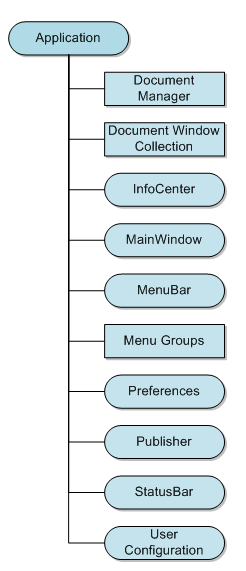
The Application object is the root object of the AutoCAD .NET API. From the Application object, you can access the main window as well as any open drawing. Once you have a drawing, you can then access the objects in the drawing. For information on working with open drawing files (documents) see, The Document Object.
DocumentManager
Container for all the document objects (there is a document object for each drawing that is open).
DocumentWindowCollection
Container for all the document window objects (there is a document window object for each document object in the DocumentManager).
InfoCenter
Contains a reference to the InfoCenter toolbar.
MainWindow
Contains a reference to the application window object of AutoCAD.
MenuBar
Contains a reference to the MenuBar COM object for the menubar in AutoCAD.
MenuGroups
Contains a reference to the MenuGroups COM object which contains the customization group name for each loaded CUIx file.
Preferences
Contains a reference to the Preferences COM object which allows you to modify many of the settings in the Options dialog box.
Publisher
Contains a reference to the Publisher object which is used for publishing drawings.
StatusBar
Contains a reference to the StatusBar object for the application window.
UserConfiguration
Contains a reference to the UserConfiguration object which allows you to work with user saved profiles.
02. Document
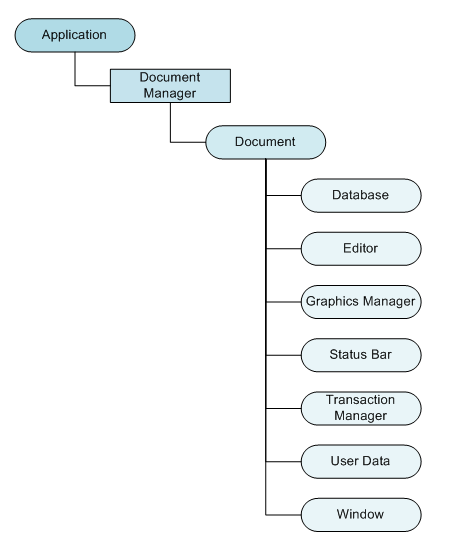
The Document object, which is actually an AutoCAD drawing, is part of the DocumentCollection object and provides access to the Database object which is associated with the Document object. The Database object contains all of the graphical and most of the nongraphical AutoCAD objects.
Get the current document and database
Document  doc = Autodesk.AutoCAD.ApplicationServices.Application .DocumentManager.MdiActiveDocument;
03. Database
The Database object contains all of the graphical and most of the nongraphical AutoCAD objects. Some of the objects contained in the database are entities, symbol tables, and named dictionaries. Entities in the database represent graphical objects within a drawing. Lines, circles, arcs, text, hatch, and polylines are examples of entities. A user can see an entity on the screen and can manipulate it.
Get the current database
 Database  db = Autodesk.AutoCAD.ApplicationServices. Application .DocumentManager.MdiActiveDocument.Database;

Database  db = HostApplicationServices.WorkingDatabase;
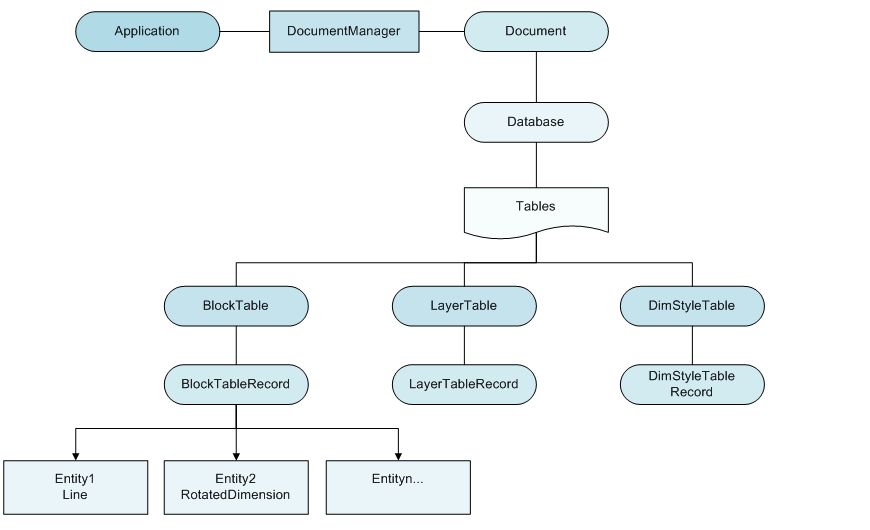
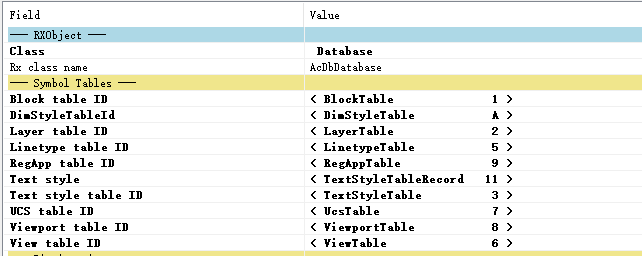
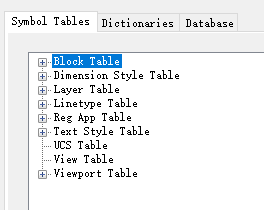
From the database, we can access the Tables as shown in the figure above, from which we can loop object IDs inside the different tables. With the ID, we can get the objects in AutoCAD.
04. Transaction
Transactions are used to group multiple operations on multiple objects together as a single operation. Transactions are started and managed through the Transaction Manager. Once a transaction is started, you can then use the GetObject function to open an object.
Database  db = HostApplicationServices.WorkingDatabase;  // current database
using ( Transaction  tr = db.TransactionManager.StartTransaction()) //using method
{
// some coding...
tr.Commit();  // commit the transaction
}
Reference
http://docs.autodesk.com/ACD/2010/ENU/AutoCAD .NET Developer’s Guide/index.html?url=WS1a9193826455f5ff2566ffd511ff6f8c7ca-3e30.htm,topicNumber=d0e26245
https://help.autodesk.com/view/OARX/2021/ENU/?guid=GUID-7E64FDE7-C818-4566-ADF8-C40D50D91E32